


ASUS ProArt P14 H7407 NVIDIA RTX Spark AI Laptop
Couldn't load pickup availability
The lightest ProArt laptop ever
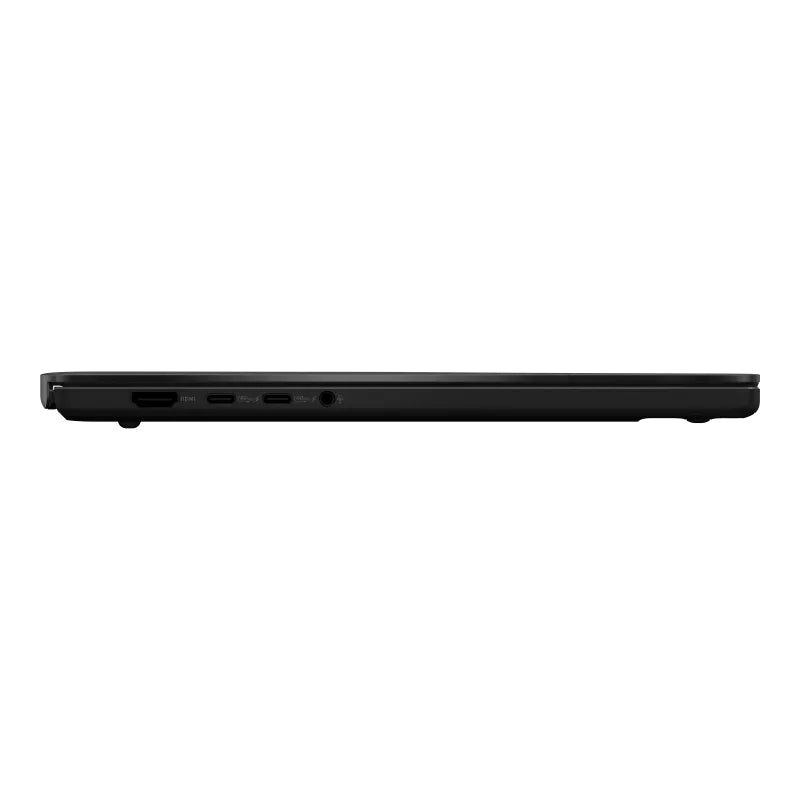
ProArt P14 is built for creators on the move. At 1.48 kg it is the lightest machine in the RTX Spark range, and the integrated chassis carries a 90Wh battery without giving up the creator panel or the memory ceiling. Up to 128GB of unified memory holds language models of up to 120 billion parameters with a one million token context window, on the device.
ASUS ProArt P14 H7407 specifications
- NVIDIA RTX Spark N1X with 6144-core Blackwell RTX GPU and 20-core Grace CPU
- 48GB or 128GB LPDDR5X unified memory, onboard
- 1TB M.2 NVMe PCIe 4.0 SSD, one M.2 2280 PCIe 5.0 x4 slot
- 14 inch 3K OLED touchscreen, 2880 x 1800, 16:10, 120Hz, 500 nits
- 3x USB4 Gen 3 Type-C at 40Gbps with DisplayPort and Power Delivery, 1x USB 3.2 Gen 2 Type-A, 3.5mm combo jack
- Backlit keyboard with 1.5mm key travel, haptic touchpad
- Wi-Fi 7 triple band 2x2, Bluetooth 5.4
- FHD camera with IR for Windows Hello, array microphone, Smart Amp
- 90Wh 4-cell battery, 140W USB-C adapter with a 240W-rated cable
- 31.07 x 21.89 x 1.39 to 1.59 cm, 1.48 kg
- TPM 2.0, Microsoft Pluton, US MIL-STD 810H
- Windows 11 Home
- In the box: ProArt MD301 wireless mouse and sleeve
- 48GB in Nano Black or Neo White, 128GB in Neo White
- 2 year ASUS warranty
- Malaysian models: 48GB H7407B-ASU020WS (Nano Black) and H7407B-ASU021WS (Neo White). 128GB H7407B-ASU221WS (Neo White)
Specifications and claims are the manufacturer's. The configurations listed are the Malaysian models.


Inside NVIDIA RTX Spark
Up to 1 petaflop
FP4 AI performance.
6,144-core
Blackwell RTX GPU.
20-core
NVIDIA Grace CPU.
Up to 128GB
LPDDR5X unified memory shared by CPU and GPU.
FAQ
Frequently asked questions
Buying in Malaysia and Windows on Arm compatibility.
-
ProArt P14 or ProArt P16, which should I choose?
The silicon is identical. Both carry the same 6,144-core Blackwell RTX GPU, the same 20-core NVIDIA Grace CPU and the same 128GB unified memory ceiling, so neither is faster than the other at the same configuration.
What differs is the panel, the battery, the storage and the card reader. The P16 has a 16-inch UHD+ 3840 x 2400 OLED with variable refresh and NVIDIA G-Sync, a 99.9Wh battery, a 1TB drive with one M.2 slot left free, and an SD Express 7.0 reader.
The P14 has a 14-inch 3K 2880 x 1800 OLED at 120Hz, which ASUS does not list with variable refresh or G-Sync, a 90Wh battery, a 1TB drive with no free slot, and an SD 4.0 reader. In exchange it weighs 1.48kg against 1.77kg.
Choose the P14 to carry it daily, the P16 for colour-critical work on a larger canvas and for the faster card reader.
-
Can I add storage to the ProArt P14 later?
Not internally. ASUS lists the P14 with a single M.2 2280 slot, and its specification counts that slot as already in use by the installed drive. There is no second bay to populate.
Malaysian units ship with 1TB. If that is tight for your model weights or media, the alternatives are external storage over one of the three USB4 Type-C ports, or the ProArt P16, which keeps one M.2 slot free.
-
How do I buy this laptop from EMARQUE?
It is in stock at EMARQUE. Choose a configuration above, add it to cart and pay at checkout, in full or by instalment (see financing). In-stock orders are dispatched in 1 to 3 working days with insured delivery nationwide.
The configurations offered are the Malaysian models, and the manufacturer's warranty is stated in the specifications above, with claims handled locally by EMARQUE. For a question before you order, WhatsApp 014 398 1914 or email business@emarque.co.
-
Will my existing Windows applications run on RTX Spark?
RTX Spark uses an Arm-based NVIDIA Grace CPU, so Windows runs x86 applications through Prism emulation, which Microsoft states is tuned for the microarchitecture of RTX Spark.
NVIDIA published its first Windows on Arm developer-preview driver in July 2026, alongside the CUDA Toolkit 13.4 developer preview, which adds native Windows Arm64 development for RTX Spark. Arm64EC lets a native Arm application keep using existing x64 libraries. NVIDIA is also partnering with Adobe to rearchitect Premiere and Photoshop for RTX Spark, work that is in progress rather than finished.
Applications compiled natively for Arm64 will run best, and most mainstream x86 software runs under emulation. If your work depends on plugin-heavy professional software, confirm its Arm64 support before ordering. EMARQUE can check compatibility for your workflow before you commit.
-

MSI Prestige N16 Flip AI+ NVIDIA RTX Spark 2-in-1 Laptop
Vendor:MSIRegular price From RM19,699.00Regular price -

ASUS ProArt P16 H7607 NVIDIA RTX Spark AI Laptop
Vendor:ASUSRegular price From RM18,999.00Regular price -

ASUS ProArt P14 H7407 NVIDIA RTX Spark AI Laptop
Vendor:ASUSRegular price From RM18,999.00Regular price -

Lenovo Yoga Pro 9n NVIDIA RTX Spark AI Laptop
Vendor:LenovoRegular price From RM13,999.00Regular price -

Lenovo Yoga 9n 2-in-1 NVIDIA RTX Spark AI Laptop
Vendor:LenovoRegular price RM13,999.00Regular price -

Microsoft Surface Laptop Ultra NVIDIA RTX Spark AI Laptop
Vendor:MicrosoftRegular price From RM19,899.00Regular price -

Dell XPS 16 Creator Edition NVIDIA RTX Spark AI Laptop
Vendor:DellPrice to be confirmed -

HP OmniBook Ultra 16 NVIDIA RTX Spark AI Laptop
Vendor:HPPrice to be confirmed


