


EMARQUE AI Eclipse Supercomputer Ryzen AI Halo
ETA: Early November 2026. Payable at Checkout
Couldn't load pickup availability
AI supercomputer on your desk
The EMARQUE AI Eclipse holds 128GB of unified memory in a chassis that sits beside a monitor. A 16-core Zen 5 processor, Radeon™ 8060S graphics and an XDNA™ 2 neural engine draw from one shared memory pool, so large language models, agents and private AI workflows run on hardware you own, under Windows or Ubuntu Linux, with nothing leaving your building.
Storage and operating system are chosen above. The full story, the hardware breakdown and the complete I/O list are on the EMARQUE AI Eclipse page, and the EMARQUE AI Utility is the software that gets you running without touching a command line.
Supplied and supported by EMARQUE, with warranty and support handled directly. We confirm your configuration with you before your unit is dispatched.



Inside the AMD Ryzen AI Halo platform
Ryzen AI Max+ 395
16-core Zen 5 CPU with Radeon 8060S graphics.
128GB unified
LPDDR5X-8000 shared by the CPU and the Radeon GPU.
Up to 120GB to GPU
120GB on supported Linux, 96GB on Windows.
Up to 50 TOPS
AMD XDNA 2 NPU for on-device AI acceleration.
Windows or Ubuntu Linux
You choose the operating system when you order, at the same price. The hardware is identical either way. What changes is the software ecosystem you get to work in.
Easy to Use. Easy to Integrate.
- The Windows desktop you already know, with the creative, productivity and gaming software you already run.
- Local AI apps and agents including the EMARQUE AI Utility, Hermes Agent, Onyx, LM Studio and ComfyUI.
- Models up to the 128B class with AMD-validated 4-bit configurations.
- Download, load and release models on-device from one place through the EMARQUE AI Utility.
- Connect AI to existing business systems over APIs, MCP and supported integrations.
Built to Develop and Deploy.
- Run vLLM, llama.cpp, PyTorch, ComfyUI and self-hosted services.
- Models up to the 200B class, following AMD Ryzen AI Halo platform guidance.
- Up to 120GB of GPU-accessible memory against 96GB on Windows, with the BIOS and kernel configuration applied by EMARQUE before the machine ships.
- The full AMD ROCm development stack, with PyTorch, HIP and accelerated AI workloads.
- Build on it as infrastructure: containers, APIs, agents and OpenAI-compatible endpoints.
Measured performance
Token speeds recorded on EMARQUE units, across models from 26 to 125 billion total parameters. Total size alone does not set speed. What matters is how many parameters are active per token: the 26B Mixture-of-Experts model here runs more than twice as fast as the dense 27B beside it, because a dense model activates every parameter on every token while that MoE activates about four billion.
Average token speed
Recorded from EMARQUE internal testing. Real-world speed varies with model, quantisation, context length and runtime, so treat these as a guide rather than a guarantee.
Hardware and full specifications
Eclipse is built on the AMD Ryzen AI Max+ 395, the processor developers know as Strix Halo, in a compact chassis that arrives ready to run.

Platform
- AMD Ryzen™ AI Max+ 395 CPU
- AMD Radeon™ 8060S Graphics
- AMD XDNA™ NPU up to 50 TOPS
- 128GB LPDDR5X-8000MT/s
- 1TB, 2TB, 4TB Gen 4x4 M.2 NVMe SSD
- Windows 11 or Ubuntu Linux
- 70 x 197.8 x 200 mm
- 240W external adapter
- 2-year warranty
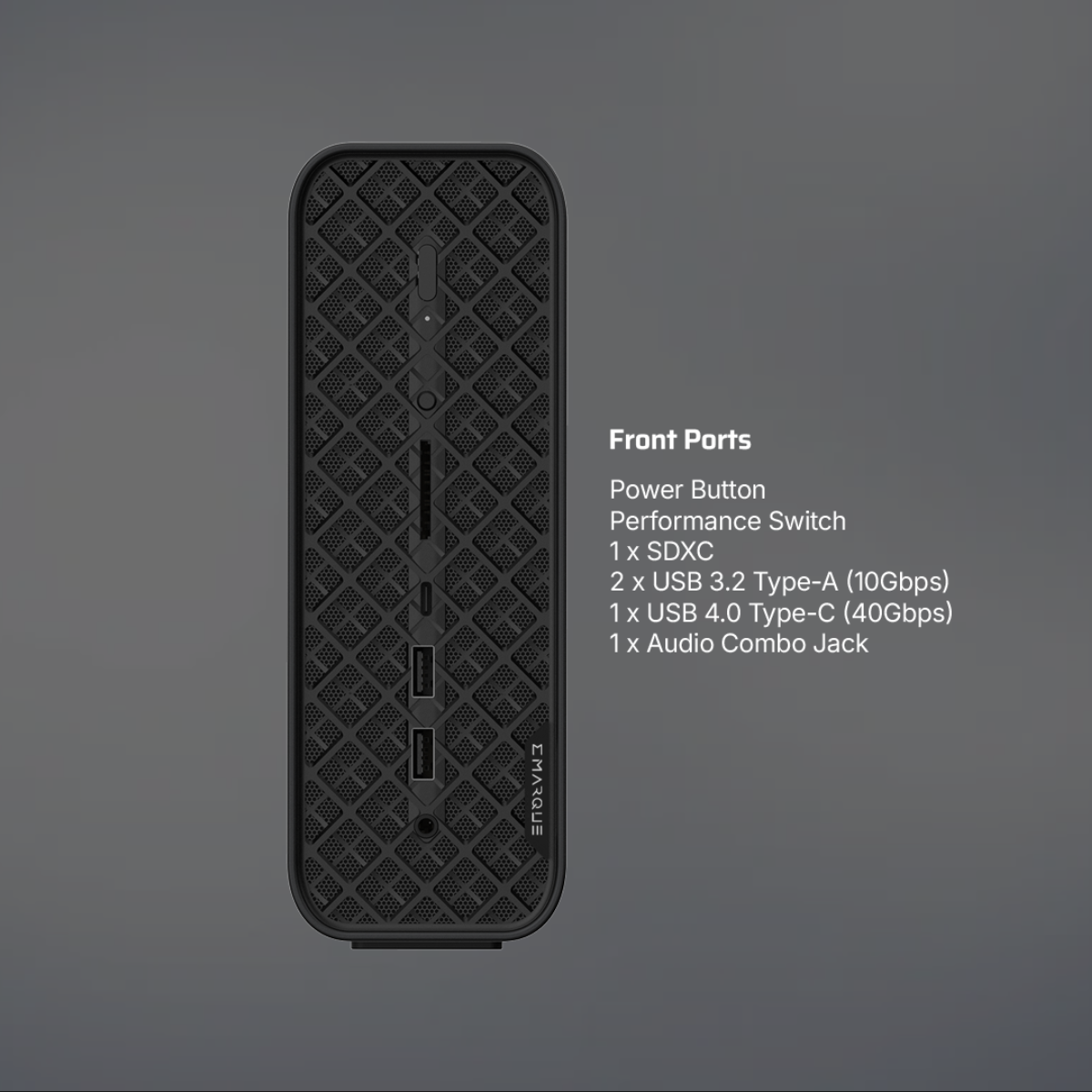
Front I/O
- 2 x USB 10 Gbps Type A
- 1 x USB 40 Gbps Type C (Alt DP2.0, PD out 15W)
- 1 x 3.5 mm Audio Combo Jack
- 1 x SD Card 4.0 (UHS-II, supports SDXC)
Rear I/O
- 2 x USB 2.0 Type A
- 1 x USB 10 Gbps Type A
- 1 x USB 40 Gbps Type C (Alt DP2.0, PD out 15W)
- 1 x HDMI™ 2.1 with HDR, supports 4K@60Hz
- 1 x DisplayPort 1.4a
- 2 x RJ45 10GbE
- 1 x 3.5 mm Audio Combo Jack
In the box
- EMARQUE AI Eclipse
- 240W AC adaptor
Storage and operating system are selected above. Supplied and supported by EMARQUE, with a 2-year warranty and support handled directly.
FAQ
Frequently asked questions
What this AMD Ryzen AI Max system is, what it can do locally, and how to choose your configuration.
-
Is the EMARQUE AI Eclipse a Strix Halo machine?
Yes. Eclipse is built on the AMD Ryzen AI Max+ 395, the processor AMD developed under the codename Strix Halo. It is the same silicon: a 16-core Zen 5 CPU, Radeon 8060S graphics with 40 RDNA 3.5 compute units, an XDNA 2 NPU rated up to 50 TOPS, and 128GB of LPDDR5X-8000 unified memory on a 256-bit bus at 256GB/s.
Up to 96GB can be made available to the GPU under Windows, and up to 120GB on Ubuntu Linux, where EMARQUE applies the BIOS and kernel configuration that unlocks it before dispatch. That holds models a conventional desktop GPU cannot fit.
Eclipse arrives complete from the factory rather than being assembled to order. What EMARQUE adds is around it: your choice of Windows 11 Pro or Ubuntu Linux and storage at the point of order, the EMARQUE AI Utility, and warranty and support handled directly rather than through a channel.
-
How does Eclipse compare to the AMD Ryzen AI Halo developer box?
AMD sells its own developer box on this platform at USD 3,999 with 2TB of storage. Eclipse uses the same Ryzen AI Max+ 395 silicon, the same 128GB of LPDDR5X-8000 unified memory and the same 256GB/s of bandwidth, so it carries the same 200 billion parameter platform capability AMD states.
The differences are in the specification and in what happens after you buy. Eclipse ships with two 10 Gigabit ports rather than one, and you choose Windows 11 Pro or Ubuntu Linux and your storage when you order rather than accepting a fixed image. Warranty and support come from EMARQUE directly instead of through a distributor channel.
-
What size AI models can it actually run?
AMD states this platform holds models of up to 200 billion parameters in device memory with 128GB installed. In practice, 7B models are fast for local assistants and coding, 14B to 32B balance capability against speed, 70B-class models suit higher-quality reasoning, and selected quantised or Mixture-of-Experts models above 100B are workable depending on architecture, quantisation, runtime and context length.
Parameter count alone does not determine speed. A Mixture-of-Experts model with more total parameters can run faster than a smaller dense model, because only a fraction of its parameters are active per token. The measured performance section above shows what that looks like on our own units.
-
Why does it have no Wi-Fi, and what is the dual 10GbE for?
Eclipse is wired by design. Its two 10 Gigabit Ethernet ports are there for serving models across your network, connecting to NAS and storage at speed, and linking multiple systems, which is where a machine like this usually sits. Wired networking holds up better than consumer wireless under sustained load.
If your deployment needs wireless, tell the EMARQUE AI team when you order and we will advise on the options.
-
How do I order, and can you help me choose the configuration?
Choose your storage and operating system above and place the pre-order. The price is payable in full at checkout, estimated arrival is early November 2026, and we will email you to confirm your configuration and delivery once the order is placed.
If you are not sure which configuration fits, tell us the models you plan to run and the EMARQUE AI team will help you choose before you order. WhatsApp 012 627 2280 or email business@emarque.co.